Pythonで出力に色をつけるにはtermcolorモジュールを使用します。
https://pypi.org/project/termcolor/
コンソールアプリケーションで、ユーザーに見逃してほしくない情報に色を付けて、目立たせたいときなどに役立ちます。
termcolorの使用方法
termcolorをインストールするにはpipを使用します。
pip install termcolor
import termcolor

warning_sentence = termcolor.colored('Warning', 'red')
print(warning_sentence)
termcolorモジュールをインポートし、coloredメソッドを使用して文字列に色をつけます。
上記のコードはWarningという文字に赤を着色して出力します。
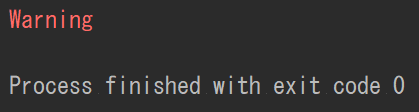
赤以外にも色をつけることができます。
赤を警告(Warning)、黄色を注意(Caution)、緑色を通知(Notice)で出力し、str.formatを利用して、飾り付けて出力してみます。
import termcolor

# 警告(Warning)
warning = '*' * 30 + '\n'
warning += '*{:^28}*\n'.format('Warning')
warning += '*' * 30 + '\n'
colored_warning = termcolor.colored(warning, 'red')
print(colored_warning)

# 黄色(Caution)
caution = '+' * 30 + '\n'
caution += '+{:^28}+\n'.format('Caution')
caution += '+' * 30 + '\n'
colored_warning = termcolor.colored(caution, 'yellow')
print(colored_warning)

# 通知(Notice)
notice = '-' * 30 + '\n'
notice += '|{:^28}|\n'.format('Notice')
notice += '-' * 30 + '\n'
colored_warning = termcolor.colored(notice, 'green')
print(colored_warning)
各文字列の出力結果は以下のようになります。
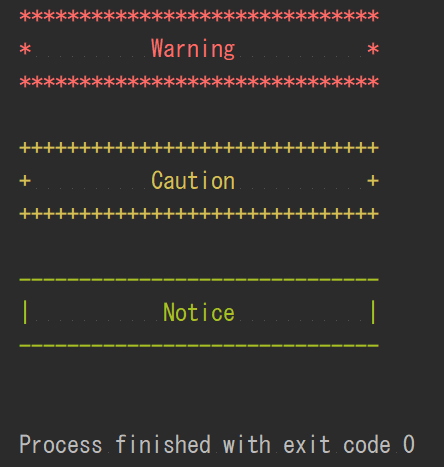
使用できる色の一覧はPyPIのtermcolorパッケージのページに記載されていますので、参照してみて下さい。